Skip to content
  • Tech News
  • How to
  • Tips & Tools
  • Tech Reviews
  • VPN
  • Software
Menu
  • Tech News
  • How to
  • Tips & Tools
  • Tech Reviews
  • VPN
  • Software
Search
Close
  • Tech News
  • How to
  • Tips & Tools
  • Tech Reviews
  • VPN
  • Software
Menu
  • Tech News
  • How to
  • Tips & Tools
  • Tech Reviews
  • VPN
  • Software
Search
Close

Home » VPN » Best VPN for iPhone of 2022

Home » VPN » Best VPN for iPhone of 2022

Best VPN for iPhone of 2022

  • Techninja Pro
  • July 14, 2021
  • 2:13 pm
atlas

The technology of Virtual Private Network, or VPN for short, is a very heavy-duty tech whose main agenda is to deliver security, privacy, and unblocking of geo-restricted content for its users. Initially, this software was pretty loaded with a lot of coding, servers, and slow-paced tech. However, a lot has changed now, and VPN software has evolved as time has passed.

Here’s a list of the top of the line VPN service providers for your protection and privacy on iPhone & iPad (iOS).

Best VPN for iPhone

SurfsharkVPN

Its apps are easy to use, and it will block almost everything with its Shadowsocks technology.

Get Surfshark Read The Review

NordVPN

NordVPN is one of the most accessible VPNs out there. It will allow you to access all kinds of streaming sites.

Get NordVPN Read The Review

ExpressVPN

ExpressVPN is the most reliable, easiest, and fastest VPN for streaming videos and Disney Plus Original Films/Movies.

Get ExpressVPN Read The Review

iTopVPN

It’s new, fast, reliable, and secure. iTop VPN unblocks streaming sites like Netflix (+ libraries) without any hurdle and delivers consistent speeds while doing it.

Get iTop VPN Read The Review

UnlimitedVPN

It has more than 500+ servers spread all across the world in 80+ locations. The servers that KeepSolid has installed are all high-speed servers.

Get VPN Unlimited Read The Review

AtlasVPN

Atlas VPN is relatively new in the market and has almost 700+ servers spread across 27+ countries worldwide.

Get AtlasVPN Read The Review

PureVPN

PureVPN has the most speedy upgrading service out of all the VPNs out there.

Get PureVPN Read The Review

PrivateVPN

It is a very user-friendly VPN and has almost 200 servers worldwide. It provides security, streaming, and privacy all-in-one.

Get PrivateVPN Read The Review


ProtonVPN

Proton VPN has a very strict no-data logging policy as it comes from a country with very strict privacy laws.

Get ProtonVPN Read The Review
See Comparison

VPN tech nowadays is so light and easy to handle. That is the reason why it is now compatible with your mobile devices or with any electronic device, per say, which has the capability of getting connected to the internet. The same has happened with the iPhone also.

Since 2010, the mobile phone industry has taken over the world by storm. Everyone has a cell phone and is now connected to the internet. According to recent studies, over half a billion mobile users have a VPN installed on their cell phones. People have many reasons for using a VPN on their cell phones, and the primary reasons are to:

  • Access the geo-restricted content.
  • Access those streaming websites and Netflix libraries that are otherwise not available in their country.
  • Gain privacy and protection from potential hacking, phishing, and tracking software.

There is not even a single VPN (among the best VPNs) that is not offering an application for iPhone or iOS users. TechNinjaPRO has gone through several VPNs by carrying out an intensive R&D in pinpointing the best VPNs for iPhone that Apple users can utilise for their privacy and protection needs.

One can say that iPhones are integrated with Apple’s privacy software like iOS 14.5, which is a tracker blocking software, but is it enough? Even an iPhone user cannot do anything when their device contacts an unprotected Wifi network or while visiting a website filled with malware and malicious content.

User’s Guide on Selecting the Best iPhone VPN?

If you are using a VPN on your computer, then the requirements may vary and may carry a different set of rules and regulations. However, when it comes to using a VPN on your iOS device, you only need to look at the following performance aspects:

  • Speed
  • Support
  • Security
  • A vast network of servers
  • Unblock geo-blocked media
  • Access streaming sites like Netflix, Disney Plus, etc.
  • The app must be user-friendly.

You see, most of your data is on your cell phone nowadays, whether it be an Android or iOS device like iPhone. So, there is a significant need for security and data breach protection that your chosen VPN should deliver and develop a virtual private network in its complete essence.

1. Surfshark VPN

Overview

Surfshark VPN has one of the best no-logging policy and the Kill Switch feature on the iOS app works perfectly. This VPN will protect your device from any type of DNS leaks and provide a split tunnelling feature in the most appropriate manner possible.

Specifications

  • Multi-hop
  • NoBorders mode
  • AES-256-GCM Encryption
  • Protocols (OpenVPN, IKEv2)
  • Camouflage mode
  • No-Logging policy
  • DNS privacy & leak protection
  • Kill Switch
  • Whitlister
  • CleanWeb
  • Unlimited Simultaneous Connections

Free Trail?

Yes

Start your Surfshark VPN 30-Day FREE Trial

Benefits

  • Effectively unblocks geo-restricted content
  • Smooth streaming & user experience
  • Airtight security and privacy
  • Speed is great
  • Unlimited simultaneous connections

Drawbacks

  • P2P behaviour is not good
  • Customer support needs improvement

App Available on

  • Windows
  • Mac
  • Android
  • iOS
  • Linux
  • Chrome
  • Firefox

The app interface or the user interface of Surfshark VPN for iOS or iPhone is very intuitive and easy to manoeuvre.

As per the jurisdiction of Surfshark VPN in The British Virgin Islands, the privacy laws of online data protection are very vigorous and provide an air locked security shield for your internet data protection needs.

It has almost 3,200 servers spread across 65 countries of the world; thus, having a massive network of servers helps access streaming websites content that is otherwise blocked as per the geo-restrictions legislation.

The home screen of the iOS app of Surfshark VPN comes with a four-tab design which is integrated with robust security tools (security protocols) and offer one-button connections. The app’s landing screen is simple, easy to navigate through, and is not clustered.

The multi-hop feature is something exclusive to Surfshark VPN. This feature in the iPhone app allows the user to hop through various servers during their VPN sessions to protect their browsing trials and helps in the delivery of complete anonymity. You will not find this feature anywhere (even in the list for the best VPNs nowadays).

Along with all of this, the app comes with firm customer support concerning literature and user guides. The self-help blogs are very detailed and can help users customise their Surfshark VPN iOS application following their needs.

The only improvement that Surfshark VPN can make in their iPhone application is to create an active option for the live support feature where you can easily connect to a VPN agent who can solve your queries instantly.

Get the Latest DEAL of Surfshark VPN Today!

Pricing Plans

Monthly

$12.95/month

Billed every month.

Buy Now

6 Months

$6.49/month

Billed USD 38.94 every 6 months

Buy Now

24 Months

$2.49/month

Billed USD 59.76 now, & annually after the first 24 months.

Buy Now

2. NordVPN

Overview

NordVPN comes integrated with the best security protocol features like WireGuard, the most modern tech in the privacy IT industry. Its wide range of servers can unblock any website with ease (including the streaming sites). NordVPN is one of those VPNs which provide the best value for money.

Specifications

  • No-Logging policy.
  • Buffer free streaming.
  • Fast & Secure internet browsing.
  • Obfuscated servers.
  • Multiple devices are supported.
  • Split tunnelling.
  • They have dedicated IP addresses
  • Masking of your IP
  • Double VPN
  • Onion over VPN
  • Kill Switch
  • Data & DNS leak protection
  • Ad & malware blockages

Free Trail?

No

NordVPN does not have a FREE Trial. However, you’ll get a 30-Day money-back guarantee if you subscribe to any of their packages.

Benefits

  • The Kill Switch feature of NordVPN is the best in the market
  • It is swift & speedy
  • The privacy and security features are hardcore, i.e. untraceable
  • It Has features like Double VPN
  • Streaming sites Netflix can be easily accessed via NordVPN
  • Affordable

Drawbacks

  • The open configuration of NordVPN is not user-friendly
  • The apps of NordVPN are slow and need speed optimisation
  • A few of the servers are a bit slow

App Available on

  • Windows
  • Mac
  • Android
  • iOS
  • Linux
  • Chrome
  • Firefox

NordVPN is another top competitor in the list for the best VPNs for the iPhone of 2021. It is one of those VPNs heavily marketed and has got a massive client base up till now. What’s the reason behind this?

Well, NordVPN has a network of servers of almost 5,200+. These servers are spread across 62 countries of the world. Not only that, NordVPN offers dedicated servers for streaming content from websites like Netflix, Amazon Prime Video, Hulu, and Disney+.

Moreover, NordVPN has its jurisdiction based in Panama. The legislation for the internet privacy laws set by the Panamanian government is very secure, and NordVPN has to follow those laws. For instance, the no-logging policy law.

NordVPN’s iOS application for iPhone and other Apple products are all integrated with those top-notch privacy laws. Whatever type of browsing you do, NordVPN will not keep any types of logs for it. Thus, you will get complete anonymity, and your data will always remain secure.

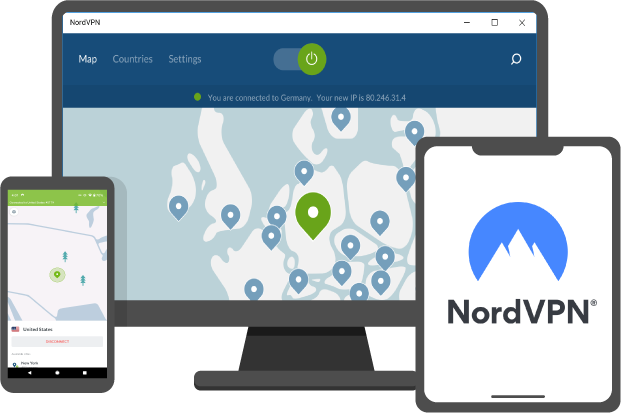
The iPhone application has a very inherent design which makes it stand out from the rest of the competition. There is no new learning that you’d have to do to use the NordVPN application. The user experience of NordVPN’s iOS application is smooth, and you can navigate on the app without any hassle of any kind.

The landing page of the iOS application will show you a blue-scale landing screen where all iPhone users can select a server from the region of their choice. They can get connected to the internet under a robust Virtual Private Network umbrella by pressing a single button.

Furthermore, with its split-tunnelling feature embedded in NordVPN’s iOS application, you can select the applications of your choice to be protected under the cloak of VPN or not. For instance, you can allow your gaming application not to be covered by a VPN to avoid slow loading speeds.

Also, with NordVPN’s iPhone app, you will have the option to connect an unlimited amount of devices simultaneously with NordVPN’s protection service. You wouldn’t have to worry about protecting other devices in your house, and businesses are not being protected and secured. This is a considerable aspect that NordVPN provides, as most of the VPNs in the market only allow five to ten simultaneous connections.

Get the Latest DEAL of NordVPN Today!

Pricing Plans

Monthly

$11.95/month

Billed every month.

Buy Now

1-Year

$4.92/month

Billed annually

Buy Now

2-Year

$3.30/month

Billed every two years

Buy Now

3. ExpressVPN

Overview

ExpressVPN is the best VPN when it comes to keeping no logs. None of your internet browsings will be recorded, stored, or even kept track of. ExpressVPN delivers complete anonymity.

Specifications

  • IP Masking
  • VPN Split Tunneling
  • AES-256 encryption
  • Encrypted DNS on every server
  • Strict No-Logging policy
  • Network Lock Kill Switch
  • Unlimited Bandwidth
  • ISP Throttling is defeated
  • Safety & Security on Public WiFi
  • 24/7 support

Free Trail?

Yes

Yes! Start your ExpressVPN FREE 1-Month Trial

Benefits

  • Advanced security features on all apps make it stand out from the rest of the VPNs
  • Best for the US, China, and Egypt
  • Unblocks streaming sites like Netflix & Disney Plus easily (especially all types of libraries)
  • Great speed was seen on all of the servers of ExpressVPN
  • Best customer support experience among all the VPNs

Drawbacks

  • The VPN connection drops more than usual (needs improvement)
  • Expensive in comparison to other VPNs
  • Servers for the sole purpose of streaming are not categorically arranged (needs attention)

App Available on

  • Windows
  • Mac
  • Android
  • iOS
  • Linux
  • Chrome
  • Router
  • Kindle Fire

The iOS application of ExpressVPN can be summed in just three words:

  1. It’s Simple.
  2. It’s Fast.
  3. It’s Effective.

ExpressVPN comes with a cavalry of 3000+ servers set in 160 locations of the world. The jurisdiction of ExpressVPN is in the British Virgin Islands, which is already famous for the security laws it has concerning online browsing and internet activity. So, there’s that benefit.

Moving forward the ExpressVPN’s iOS application is high-speed. It does not slow down any of your device’s performance and helps you surf the internet quickly and easily. The speed specs are pretty great, and ExpressVPN has no intention of slowing down.

You can connect your device with ExpressVPN’s iOS app without any hassle. It has a single button operation in its application and automatically finds the best and the fastest server for you based on your location. Suppose you are not satisfied with the automatically chosen server for you. In that case, you can always select a server of your choice from your ExpressVPN iOS app by pressing the drop-down server location selector and choose the best one based on the hit & trial method.

Other options which are offered in the iOS of ExpressVPN are:

  • Manual selection of security and privacy tools.
  • Accounts settings options (for customization).
  • On-board IP address checker.
  • Leak tester.
  • Password generator.

The iOS app of ExpressVPN is powered by TrustedServer technology, and thus it does not keeps any types of logs of its users. ExpressVPN is used by millions of people worldwide as it is one of the best VPNs in the market nowadays.

The customer support for the iOS app is also well-built in only one regard. The amount of literature it has on topics like setting up a VPN, Tor over VPN, double VPN, etc., is all awe-inspiring. However, the live chat support needs improvement.

You will also find a wide range of FAQs in the iOS app for your VPN queries to enhance your VPN browsing experience.

Get the Latest DEAL of ExpressVPN Today!

Pricing Plans

Monthly

$12.95/month

Billed every month.

Buy Now

6-Months

$9.99/month

Billed every six months

Buy Now

15-Months

$6.67/month

Billed annually. (Free for 3-months)

Buy Now

4. iTop VPN

Overview

iTop VPN will top-up the security features already integrated into your iPhone’s iOS system and will deliver you the privacy level you always craved for. It has military-grade encryption and unlocks all types of region-locked content.

Specifications

  • Unlimited Data
  • Unlimited Bandwidth
  • Network Kill Switch
  • Robust No-logging Policy
  • AES-256 bit Encryption
  • Five Simultaneous Connections
  • Extra Browser Privacy
  • Block Ads, Malware, & Trackers
  • VIP Servers for Social Media, Gaming, & Streaming

Free Trail?

No

They offer a money-back guarantee of 15-days and have a Free Version of iTop VPN.

Benefits

  • Allows unlimited data bandwidth.
  • Connection speeds are great for streaming video online.
  • Good no-logging policy.
  • Kill Switch works great.
  • The use of AES-256 bit encryption makes your internet traffic seem secure

Drawbacks

  • There is a limit on bandwidth on the free version (700 MB).
  • Security can be enhanced

App Available on

  • Windows
  • Android
  • iOS

We all know that the security offered by iPhone’s iOS system is pretty marvelous and people who are looking for built-in security features in a device mostly go for the Apple iPhone.

iTop VPN is currently offering applications on only three platforms i.e., Windows, Android, and iPhone (iOS). They are promising to launch their next VPN client on Mac as per the product’s increasing demand.

The user-interface of iTop’s iPhone client is simple, straightforward, and easy-to-use. One does not need to have technical knowledge of VPNs before using the application. Even a beginner can navigate seamlessly over the application and utilize the VPN to its fullest.

Further, the application comes with a built-in Network Kill Switch. If you are not familiar with the function of a Network Kill Switch you can read about the importance of this feature here.

In addition to this, iTop VPN uses state of the art 256-bit AES Encryption as it is the best encryption in the world right now. It is used by the military, giant financial institutions, sensitive organizations, and in the corporate sector to protect their data. All of your internet traffic will be ciphered by this encryption and not even the world’s greatest super computers can work together to decipher your online activities.

Lastly, all of your applications on your iPhone will be covered by the VPN including your social media applications. Your personal data, chats, and all the files you share online will take place under the umbrella of iTop’s secure VPN tunnel.

Get the Latest DEAL of iTop VPN Today!

Pricing Plans

1-Month

$11.99/month

Billed monthly.

Buy Now

6-Months

$6.99/month

Billed every six months.

Buy Now

1-Year

$2.31/month

Billed annually. (Save 80%)

Buy Now

5. VPN Unlimited

Overview

VPN Unlimited is a product of KeepSolid Inc. It is virtual private network software developed for the primary purpose of delivering internet privacy and security.

Specifications

  • Integrated with Five Security Protocols
  • AES-256 Encryption
  • Dedicated IP address
  • Dedicated VPN servers
  • Dedicated Streaming servers
  • Unlimited Bandwidth
  • No-Logging Policy
  • DNS Firewall
  • Kill Switch
  • DNS/IP/WebRTC address Leak Prevention
  • Trusted Network feature
  • Custom Technology like KeepSolid Wise
  • SOCKS5 technology

Free Trail?

Yes!

Start your PureVPN 7-Day FREE Trial

Benefits

  • Reliable connections (i.e. they do not drop easily)
  • Security is not compromised. The switching between various server locations is fast and efficient
  • P2P security
  • Dedicated IP addresses

Drawbacks

  • The Privacy Policy is a bit vague as VPN Unlimited is based in the USA
  • Needs more servers
  • Ad Blocking should be integrated as a new feature in the apps

App Available on

  • Windows
  • Mac
  • Android
  • iOS
  • Linux
  • Chrome
  • Firefox
  • Kodi
  • Firestick
  • Opera
  • Edge
  • Apple TV
  • Google Chromecast
  • Amazon Fire

VPN Unlimited allows its users to manually select the server that they’d like to connect to . The automatic selection of the best server by their application is also provided for their customers; they will connect you to the fastest server by default if you don’t want to select the server manually.

The iOS app of VPN Unlimited has the same interface as its other applications have. It is simple, easy to use, and navigate.

The application allows you to zoom in and out. You can select individual servers manually or let the app detect the best server for you based on your location.

You can see the list of servers that VPN Unlimited has to offer, along with the server loads each server is carrying right now. The ping time is also mentioned in the application to choose the best server for a speedy internet browsing experience.

Navigate to the settings panel in VPN Unlimited’s iOS application. You’ll find that you can choose between the security protocols which VPN Unlimited is offering in its iOS application, which are:

  • OpenVPN
  • IKEv2
  • WireGuard
  • KeepSolid’s own WiseTCP & Wise UDP.

The only thing which should be integrated into VPN Unlimited’s iOS app is the option of a Kill Switch.

Get the Latest DEAL of VPN Unlimited Today!

Pricing Plans

Monthly

$7.99/month

Billed monthly

Buy Now

1-Year

$3.99/month

Billed annually

Buy Now

Lifetime

$159.99/month

Billed once

Buy Now

6. AtlasVPN

Overview

AtlasVPN is a new VPN in the VPN industry. Although it does have a small coverage of servers, the speed factors are pretty awesome. You can expect great things from this VPN as it has already beaten several other great VPNs in speed stability.

Specifications

  • Data Breach Scanner
  • Network Kill Switch
  • Ultra-fast connectivity speed
  • SafeBrowse mode
  • App is optimized for streaming purposes especially for Netflix, Disney+, HBO, Amazon Prime, etc
  • Unlimited Simultaneous Connections
  • Unlimited Bandwidth
  • AES-256 encryption
  • Data Leak Protection

Free Trail?

Yes!

If you feel satisfied with their service, then you can move forward to Get the AtlasVPN Premium Version.

Benefits

  • Offers a free version for testing of their performance
  • Netflix compatibility is pretty impressive
  • Servers are speedy
  • Their applications are very user-friendly and easy to navigate

Drawbacks

  • Uses only one security protocol. Features are limited
  • VPN servers are in small numbers (thus less coverage)
  • The Privacy Policy is vague as AtlasVPN is based in the US

App Available on

  • Windows
  • Mac
  • Android
  • iOS

The best thing about the applications offered by Atlas VPN is the consistency. You’ll find no difference in their Android and iOS apps.

The first feature that will catch your eye in the Atlas VPN’s iOS app is the SafeBrowse Plus feature. It is placed in the security options tab. What does it do?

The SafeBrowse feature helps in blocking malicious websites. Let’s say you are trying to access a website that contains malware or malicious files in the form of pop-ups and ads. The SafeBrowse feature in Atlas VPN’s iOS app will detect those malicious websites in advance and block them. The application will not only block those websites but also will blacklist them.

Moreover, the SafeSwap feature in Atlas VPN’s iOS application is a unique feature that we have not found in any of the other VPNs so far. The primary function of this feature is to rotate your IP address and keep it in rotation while you are connected to the VPN servers. To do this manually in a VPN app, you’ll have to continually connect and disconnect via various servers to rotate your IP address (which is very hard, without any doubt). Atlas VPN’s iOS app does it for you (automatically).

For instance, you access a website via the iOS app of Atlas VPN. The pages of that website will be accessed via a one-IP address. If you jump on to another website, Atlas VPN will automatically change your IP address on that site so that you cannot get tracked. Isn’t that amazing?

As told by Atlas VPN, the main agenda of their product is to deliver the maximum level of security and privacy to its users for their online activity needs. For now, you can access the SafeSwap feature from three locations only:

  1. The USA.
  2. Singapore
  3. The Netherlands.

As Atlas VPN is considerably a new company, that’s why their servers are less in number if you draw a line of comparison with the rest of the top quality VPNs. However, it’s growing and has nothing but quality and value for money to offer.

Get the Latest DEAL of Atlas VPN Today!

Pricing Plans

Monthly

$9.99/month

Billed monthly

Buy Now

1-Year

$2.49/month

Billed annually (Save 75%)

Buy Now

3-Year

$1.39/month

Billed every three years (Save 86%)

Buy Now

7. PureVPN

Overview

The biggest network of servers that we have found so far is the server network of PureVPN. It has 6,400+ servers spread across 140 countries. All of these servers are capable of bypassing restricted content all over the internet safely & securely.

Specifications

  • OpenVPN Protocol
  • IKEv2 Protocol
  • L2TP/IPsec Protocol
  • SSTP Protocol
  • AES-256 bit encryption
  • VPN Kill Switch
  • Dedicated IP
  • DDoS protection
  • Port Forwarding
  • DNS & IPv6 Leak Protection

Free Trail?

Yes!

Start your PureVPN 7-Day FREE Trial

Benefits

  • The server collection is huge
  • High speed streaming & browsing servers
  • No-logging policy is strict
  • Split-tunneling feature is state of the art
  • Best for Apple products

Drawbacks

  • Issues with Netflix performance were found
  • Limited simultaneous connections
  • Customer support is a little dodgy

App Available on

  • Windows
  • Mac
  • Android
  • iOS
  • Linux
  • Chrome
  • Firefox
  • Kodi
  • Firestick

PureVPN has their privacy plans regularly updated, and they have made their privacy policy so that it is straightforward to read. They have many applications that are compatible with almost all types of devices you can think of.

As per their massive coverage by the number of servers they have to offer, you will not have to worry about any of your online activity and streaming content needs.

Furthermore, they do not keep track of your online surfing because of their no-logging policy and do not keep track of any types of DNS requests.

PureVPN’s iOS application hides your IP address and the server’s IP address with which you are roaming on the internet. Similar to other top-rated VPNs, it is integrated with AES-256 bit encryption, which will encrypt your internet traffic and help you transfer any data online without any threat of a data breach or hacking.

The iOS app of PureVPN comes installed with several exciting features. The best feature so far is the WiFi security feature. Turn this feature ON from your PureVPN iOS application on your iPhone. Whenever you connect to the internet, your device will automatically turn on your VPN connection as well. Thus, making it secure every time.

In addition to that, the DDoS protection feature in PureVPN’s iOS app for iPhone users will protect your device from all kinds of DDoS (Denial of Service) attacks that hackers impose to extract your data from your iPhone or install malicious software in your iPhone.

The iOS app of PureVPN is very user-friendly and is very easy to navigate upon.

Get the Latest DEAL of PureVPN Today!

Pricing Plans

Monthly

$10.95/month

Billed monthly.

Buy Now

1-Year

$3.74/month

Billed annually. (Save 66%)

Buy Now

2-Year

$2.88/month

Billed every six months

Buy Now

8. PrivateVPN

Overview

The best performance feature of PrivateVPN is the delivery of a stable streaming service that does not cause any types of abnormalities like lagging and buffering. In addition, the privacy specs of PrivateVPN are also solid.

Specifications

  • AES-256 bit encryption (2048-bit)
  • Zero Data Logging Policy
  • IPv6 Leak Protection
  • Kill Switch
  • Unlimited Bandwidth
  • P2P friendly
  • Port forwarding
  • OpenVPN Protocol
  • IKEv2 Protocol
  • PPTP Protocol
  • L2TP Protocol
  • IPsec Protocol

Free Trail?

Yes!

Start your PrivateVPN 30-Day FREE Trial Today!

Benefits

  • Unblocks geo-restricted content easily
  • One-Click VPN setup for Mac, Windows, iOS, Linux, Android, & Router
  • Works perfectly in China, Egypt, & UAE
  • Best for Netflix & Disney Plus. The speed performance is impressive

Drawbacks

  • Limited simultaneous connections
  • Server network is a bit small
  • Kill Switch is only integrated into the Windows app
  • Customer support is not great

App Available on

  • Windows
  • Mac
  • Android
  • iOS

PrivateVPN is a rare VPN service that provides an uninterrupted VPN service that works 24 hours a day. It is one of the most reliable VPNs when it comes to server connection reliability.

Also, it comes integrated with:

  • OpenVPN (UDP/TCP)
  • IKEv2
  • IPSec

These security protocols help PrivateVPN create a tunnel that will direct all of your internet traffic from your iPhone via that secure encrypted tunnel. This decreases the possibility of tracking, tracing, and hacking.

Furthermore, it does not collect any data from its users as per its no-logging policy. So, if any third-party buyers come sniffing around to get your data from PrivateVPN, there is no data to be sold or shared as there was no data stored, to begin with.

Lastly, for your iOS application, the app is embedded with blocking websites containing malware and malicious content. This will protect you from any future frauds and man-in-the-middle attacks. The encryption used by PrivateVPN is military-grade encryption, which is almost near to impossible to crack.

Get the Latest DEAL of PrivateVPN Today!

Pricing Plans

Monthly

$8.99/month

Billed every month. (Save 9%)

Buy Now

3-Months

$6.00/month

Billed every three months.

Buy Now

24-Months

$2.50/month

Billed every two years. (Save 77%)

Buy Now

9. ProtonVPN

Overview

ProtonVPN is one of those VPNs that is open-source and developed by one of the most highly respected cybersecurity firms globally. It offers unlimited bandwidth, keeps no logs, and keeps any caches like many other VPNs in the market.

Specifications

  • All apps of ProtonVPN are open source
  • Strict No-Logging policy (Switzerland Jurisdiction)
  • Adblocker (NetShield)
  • AES-256 bit encryption
  • Forward secrecy
  • IPsec Protocol
  • IKEv2 Protocol
  • L2TP Protocol
  • PPTP Protocol
  • DNS Leak prevention
  • Tor over VPN
  • Kill Switch is Always-On

Free Trail?

It does have a ProtonVPN FREE VERSION. However, there is no Free Trial.

Download Free ProtonVPN and experience before you BUY

Benefits

  • Very strong in the streaming area especially for Netflix, BBC iPlayer, and Disney Plus
  • The no-logs, and no-leaks policy is impressive in performance
  • Proton VPN is based in Switzerland, thus it is very privacy friendly

Drawbacks

  • Configuration is a bit difficult
  • Limited P2P availability
  • Only offers email support

App Available on

  • Windows
  • Mac
  • Android
  • iOS
  • Linux

Initially, ProtonVPN was only available on PC or Mac devices, but as they have grown and made a mark in the VPN industry, they have launched ProtonVPN applications for Linux, Andriod and iOS as well.

ProtonVPN is all about getting over the censorship blocks, reaching online resources which are blocked, and unblock various streaming sites. Its primary purpose is to deliver the utmost security, transparency, and privacy one needs in this day and age of DT (data technology).

It is built by former CERN scientists and has almost one million people using ProtonVPN right now. ProtonVPN is not a VPN to be taken lightly based on this colossal clientele while choosing the best VPN for your iOS and iPhone needs.

The iPhone application of ProtonVPN comes integrated with a very user-friendly interface where you can connect to a server of your choice or allow the application to connect to the best VPN server under your location automatically. Just by pressing a single button, your drive will get connected to the robust security protocols of ProtonVPN.

The primary security protocol used by ProtonVPN is IKEv2. The reason for this protocol being installed in the iOS application of ProtonVPN is, it provides:

  • Speed (irrespective of your location or bandwidth).
  • Stability (even in adverse mobile network conditions, i.e., no connectivity issues).

In addition to all of that, ProtonVPN is based in Switzerland. The jurisdiction of Switzerland is supremely internet friendly as per their very strict internet privacy laws and regulations. No one can get up and ask for anyone’s internet history or browsing habits. This means that your freedom on the internet will not be compromised in any manner whatsoever.

ProtonVPN claims that their iOS app is for those iPhone users looking to get back their digital privacy, protect their devices from data breaches, and bypass restricted sites.

Get the Latest DEAL of ProtonVPN Today!

Pricing Plans

Basic

$4.00/month

(Save $12 yearly)

Buy Now

Plus

$8.00/month

(Save $24 yearly)

Buy Now

Visionary

$24.00/month

(Save $72 yearly)

Buy Now

The Best VPN Services of 2021 - Comparison Chart

Servers Location of Servers (Countries) No-logs Kill Switch Unlimited Bandwidth Jurisdiction Simultaneous Connections Encryption Free Trial Pricing
NordVPN 5,400 62 Panama 6 AES-256-GCM $4.92/month (1-Year)
ExpressVPN 3,000+ 94 The British Virgin Islands 5 AES-256 $4.92/month (1-Year)
SurfSharkVPN 3200 65+ The British Virgin Islands Unlimited AES-256 $2.49/month (1-year)
PureVPN 6,500 140 Hong Kong 10 AES-256 $4.00/month to $24.00/month(1-Year)
AtlasVPN 700+ 27+ Delaware, USA Unlimited AES-256 Free Version $4.99/month(1-Year)
ProtonVPN 1,246 55 Switzerland 4-10 AES-256 Free Version $4.00/month to $24.00/month(1-Year)
VPNUnlimited 500+ 80 NewYork, USA 5-10 AES-256 $4.99/month(1-Year)
CyberGhost 6,000 88 Romania 1-7 AES-256 $3.99/month(1-Year)
HotspotShield 1,800 80 United States 5 AES-256 $7.99/month to $11.99/month(1-Year)

Final Say

Using a VPN is to protect your device. It’s all about data protection in this day and age and internet privacy. The Internet was meant to be free, and that’s how it is supposed to be, so make the right choice by selecting the best VPN for your iPhone today.
We Can Also Help With .

Be the first to read about the recent tech news, reviews, and problem-solving DIYs by Signing Up with us Today!

Join our Newsletter .

Be the first to read about the recent tech news, reviews, and problem-solving DIYs by Signing Up with us Today!

VPNs for You!

What’s The New Afdah Site? Top 10 Afdah Alternatives

September 23, 2022

How To Watch Power on Netflix? [Ultimate Guide]

September 20, 2022

How To Watch Assassination Classroom on Netflix? [Ultimate Guide]

September 20, 2022

How To Watch Danganropa On Netflix Using a VPN? [Ultimate Guide]

September 20, 2022
Table of Contents
Table of Contents

Best VPN Deals

Best For Value

Visit NordVPN

Save 64%

Best Overall

Visit Express VPN

Save 49%

Best For Mac and PC

Visit Surfshark VPN

Save 82%

popular categories.
VPNs
Software
Reviews
Tips & Tools
Tech News
Categories .
  • VPN
  • Software
  • Tech Reviews
  • DIYs(Tips and Tools)
  • Latest News
VPN (Cyber Security) .
  • Best VPNs
  • iOS VPN
  • Android VPN
  • Windows VPN
  • Mac VPN
  • Streaming VPN
  • Budget VPN
Software .
  • IObit (Windows PC)
  • AOMEI (Windows PC)
  • Mackeeper
  • Antivirus
  • Sales and Marketing
About us .
  • Contact us
  • About us

© 2022 techninjapro.com - All Rights Reserved

Facebook Twitter Instagram Pinterest Linkedin
nord-vpn-devices

Limited Time Offer!

30-DAY MONEY-BACK GUARANTEE

Days
Hours
Minutes
Seconds

3 months free for a 2-year plan!
64% off: Get the Ultimate Security Package.
Try it RISK-FREE for 30 days!

Get NordVPN Now!